Scenes, sources, and backgrounds
A Scene describes everything on the sky. It has exactly
three SceneElement slots, and there is no way to add
a fourth:
source: what you are measuring (required),host: any other object whose light lands in the same aperture,background: the diffuse sky.
The fastest way to build one is get_scene().
What goes in which slot
The slots are roles, not object types. The same star is a source when you
are measuring it and a host when it sits next to something else you are
measuring. Ask two questions.
Am I measuring it? Only source contributes signal. host and
background contribute photons, and therefore shot noise and saturation
charge, but never signal. There is one source per scene.
Is it resolved? This is set by surface_brightness and decides how the
light is spread over pixels. It matters far more than which slot the element
sits in; see How an element is distributed on the detector.
I am measuring it |
It is contaminating my aperture |
|
|---|---|---|
Unresolved or compact |
|
|
Resolved or extended |
not expressible (the source is always a point) |
|
Worked examples
# A star you are measuring. Nothing else in the aperture.
get_scene("G5V", mag=25.4, bandpass="johnson_r", background="zodi")

# A neighbouring star contaminating that aperture: same kind of object,
# different role. Unresolved, so it follows the same PSF as the target.
get_scene("G5V", mag=25.4, bandpass="johnson_r",
          host="G5V", host_prop={"mag": 22, "bandpass": "johnson_r"},
          background="zodi")

# A resolved background galaxy behind the target: extended, so give it a
# surface brightness in mag/arcsec² instead of an integrated magnitude.
get_scene("G5V", mag=25.4, bandpass="johnson_r",
          host={"name": "ngc_0628", "mag": 22.5,
                "surface_brightness": True},
          background="zodi")

# A transient in a galaxy: the host has a shape. Total host mag 16, n=4
# bulge, half-light radius 0.5", source 0.3" from the nucleus.
get_scene("G5V", mag=21, bandpass="johnson_r",
          host="G5V",
          host_prop={"mag": 16, "bandpass": "johnson_r", "profile": "sersic",
                     "r_eff": 0.5, "n": 4, "dx": 0.3},
          background="zodi")
Answers to the usual questions
- Is a star a source or a host?
Whichever role it is playing. If you are measuring it, it is the
source. If it is contaminating someone else’s aperture, it is thehost.- Is a background galaxy a host?
Yes. Then decide whether it is resolved. A compact or unresolved one keeps the
surface_brightness=Falsedefault. An extended one getsprofile="sersic", orsurface_brightness=Truealone if the galaxy is much larger than the field. Declaring an extended galaxy as a bare integrated magnitude concentrates all of its light into the PSF core and overstates the peak pixel.- Can I have two contaminants?
Not at present, since there is one
hostslot. Combine them into a single equivalent magnitude, or model the dominant one.- Why is it called “host”?
The ETC grew out of supernova cosmology, where the
sourceis a supernova and thehostis its host galaxy. The bundledhsiao07SN Ia template and the Brown galaxy atlas come from that lineage. Read it as “the other object in the aperture” rather than as a host galaxy in particular.
Note
host has no physics of its own. The simulation classifies every
element by its surface_brightness flag, never by its slot name. The
name only selects the defaults you get: background defaults to the
zodiacal sky with surface_brightness=True.
Building a scene
from wcc_etc import get_scene

scene = get_scene(
    "G5V",                   # source spectrum name
    mag=15,                  # source magnitude
    bandpass="johnson_r",    # band the magnitude is defined in
    host=None,               # optional host spectrum name
    background="zodi",       # sky background
    background_prop={"bandpass": "johnson_r", "mag": 22.5},
)
host_prop and background_prop are dictionaries of keyword arguments
forwarded to the host and background elements, mirroring the source keywords.
How an element is distributed on the detector
Every element is classified by its own surface_brightness flag, and that
flag decides how its light is spread over pixels:
surface_brightness=False(the default for source and host)The magnitude is an integrated magnitude, so the count rate is a total. The element is treated as unresolved and co-located with the source: it is rendered through the same PSF and contributes
total x enclosed_fractioninside an aperture. A host declared this way adds shot noise and peak-pixel charge, and never counts as signal.surface_brightness=True(the default forzodi/background)The magnitude is per square arcsecond, so the count rate is per pixel and is applied uniformly across the detector. This is the right treatment for the sky and for a host much larger than the field of view.
profile="sersic"(anysurface_brightness)The element has a spatial profile. It is rendered as a Sersic galaxy, convolved with the PSF, and added pixel by pixel. See Hosts with a spatial profile: Sersic galaxies.
# unresolved companion/host: total rate, follows the source PSF
get_scene("G5V", mag=20, host={"name": "G5V", "mag": 16})

# resolved, extended host: mag per arcsec^2, uniform per pixel
get_scene("G5V", mag=20,
          host={"name": "G5V", "mag": 22, "surface_brightness": True})

# resolved host with a shape: total mag 16 spread over a Sersic profile
get_scene("G5V", mag=20,
          host={"name": "G5V", "mag": 16, "profile": "sersic", "r_eff": 0.5})
Hosts with a spatial profile: Sersic galaxies
At the WCC plate scale (16.9 mas/pix) a 1″ galaxy spans about 60 pixels, so
how much host light falls under the aperture depends on the galaxy’s shape
and on where the source sits in it. A TDE on the cusp of a bulge sees far
more host shot noise than a supernova an arcsecond out on a disk.
profile="sersic" renders the host as an elliptical Sersic profile,
convolves it with the rendered PSF, and shares that one image with
simulate(),
get_snr(),
get_image_exptime_for_snr(),
get_peak_pixel() and
is_saturated().
key |
unit |
default |
meaning |
|---|---|---|---|
|
str |
none |
|
|
arcsec |
required |
half-light radius along the major axis |
|
none |
1 |
Sersic index: 1 is an exponential disk, 4 a de Vaucouleurs bulge |
|
none |
0 |
ellipticity \(1 - b/a\) |
|
deg |
0 |
major-axis position angle, counter-clockwise from +x |
|
arcsec |
0 |
offset of the host centre from the source (+x right, +y up) |
The magnitude keeps its usual meaning. With the default
surface_brightness=False, mag is the total integrated host magnitude.
With surface_brightness=True it is \(\mu_e\), the surface brightness
at r_eff in mag/arcsec². Parameters are angular only, so convert physical
sizes and absolute magnitudes yourself. Typical r-band values are
\(n\) = 1 to 4, \(r_e\) of 0.3 to 1″ for hosts at
\(z \approx 0.5\) to 1 and 1 to 10″ for nearby galaxies, and
\(\mu_e\) of 20 to 24 mag/arcsec².
from wcc_etc import get_scene, Simulation

scene = get_scene(
    "G5V", mag=21, bandpass="johnson_r",
    host="G5V",
    host_prop={"mag": 16, "bandpass": "johnson_r",
               "profile": "sersic", "r_eff": 0.5, "n": 4,
               "ellip": 0.3, "pa": 45, "dx": 0.3},
    background="zodi",
)
sim = Simulation.from_sensorfilter("zwo:r", scene)
sim.get_snr(60)["snr"]                 # host shot noise included

sim.update(host__dx=0.0)               # move the source onto the nucleus
sim.update(host__r_eff=1.0, host__n=1) # profile parameters are mutable
The profile parameters are mutable like any other element parameter, so
update sweeps over host__mag, host__r_eff or host__dx work.
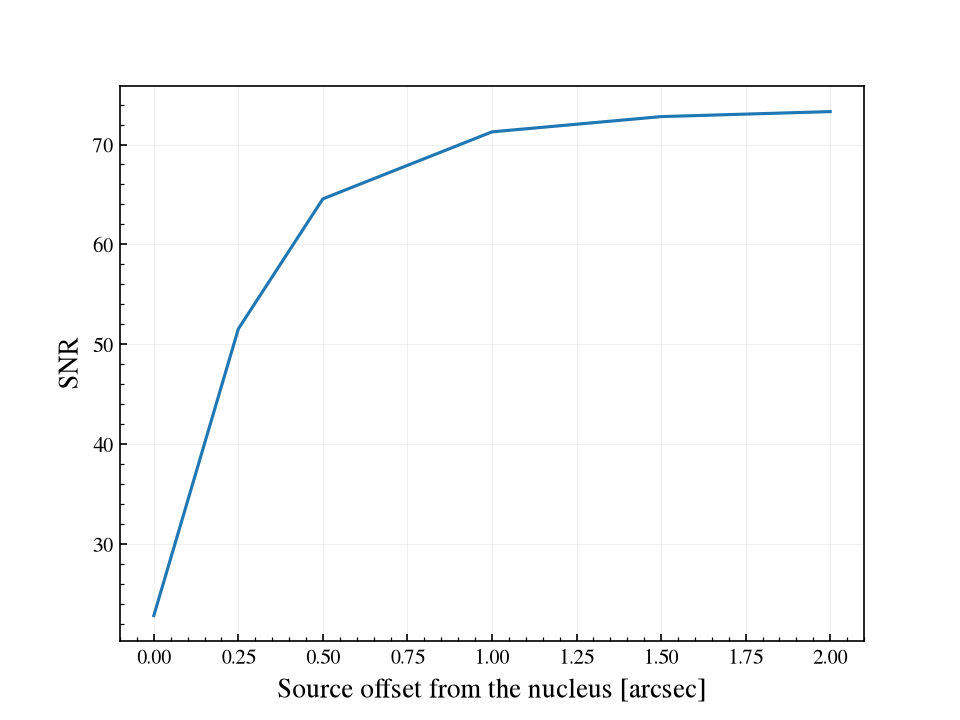
Moving a mag-21 transient out from the nucleus of a mag-16 bulge recovers most
of the SNR within an arcsecond:
import matplotlib.pyplot as plt
import numpy as np
import wcc_etc
from wcc_etc import get_scene, Simulation

wcc_etc.set_wcc_style()

scene = get_scene(
    "G5V", mag=21, bandpass="johnson_r",
    host="G5V",
    host_prop={"mag": 16, "bandpass": "johnson_r",
               "profile": "sersic", "r_eff": 0.5, "n": 4, "dx": 0.0},
    background="zodi",
)
sim = Simulation.from_sensorfilter("zwo:r", scene)

fig, ax = plt.subplots()
sim.plot_sweep("host__dx", [0, 0.25, 0.5, 1.0, 1.5, 2.0], time=60, ax=ax)
ax.set_xlabel("Source offset from the nucleus [arcsec]")
The deprecated analytic path (get_snr_airy) cannot place a profile and
warns that it ignores it. The Sersic host tutorial has images and more sweeps.
Magnitude systems
Magnitudes are interpreted in the Vega system by default
(magsys="vegamag"). Pass magsys="abmag" (case-insensitive) to use AB
magnitudes. The setting applies per element, so source, host_prop and
background_prop can each carry their own magsys:
scene = get_scene(
    "G5V", mag=15, magsys="abmag", bandpass="johnson_r",
    background="zodi",
    background_prop={"bandpass": "johnson_r", "mag": 22.5, "magsys": "abmag"},
)
The AB\(-\)Vega offset is negligible in Johnson V (about 0.002 mag) and grows toward the red (about 0.26 mag in R and 1.9 mag in K), so the choice matters most for red bandpasses.
Stellar and galaxy templates
Any name recognized by the bundled spectral libraries works as a source
or host: Pickles stellar types ("G5V", "K3IV", "M0V" and so
on) and the Brown galaxy templates. They are normalized to the requested
mag in the requested bandpass. Every element draws itself with
show(), which is the quickest check that
you picked the template you meant:
fig, ax = plt.subplots()
for spectral_type in ("A0V", "G5V", "M5V"):
    source = get_scene(spectral_type, mag=15, bandpass="johnson_r").source
    source.show(
        ax=ax, wave=np.arange(3500, 9500, 5.0), flux_unit="flam",
        label=spectral_type,
    )
ax.legend()
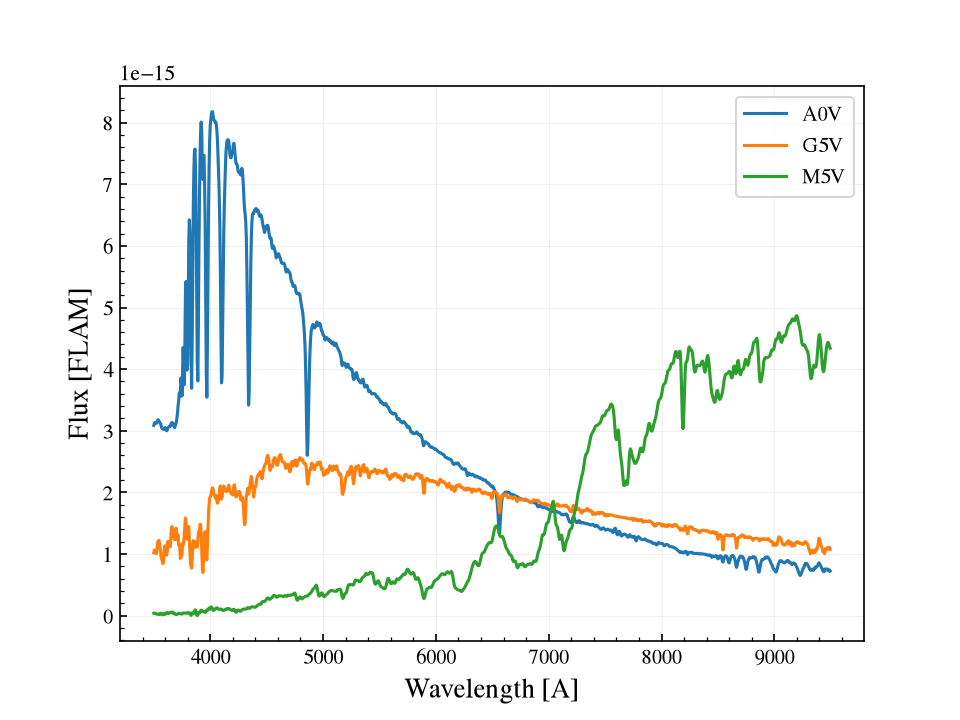
Three stars of the same r-band magnitude put very different amounts of light at the blue and red ends of the WCC band, which is why the PSF is rendered at a source-weighted wavelength (see The wavelength the PSF is rendered at).
Parametric source spectra
Instead of a template name, get_scene accepts reserved parametric names
that synthesize a synphot spectrum from keyword arguments:
|
Key arguments |
Meaning |
|---|---|---|
|
|
Planck blackbody at the given effective temperature. |
|
|
Flat in \(F_\nu\) (AB-flat, default) or flat in \(F_\lambda\). |
|
|
Power law \(F_\lambda \propto \lambda^{\alpha}\) about a reference wavelength. |
|
|
Sum of Gaussian emission lines; |
Examples:
# A 3000 K blackbody source at mag 18
scene = get_scene("blackbody", mag=18, teff=3000, bandpass="johnson_r")

# An AB-flat source
scene = get_scene("flat", mag=20, flat_unit="fnu")

# A blue power law, F_lambda ~ lambda^(-1)
scene = get_scene("powerlaw", mag=19, alpha=-1.0, lambda_ref=5500)

# An emission-line source (absolute flux; mag may be None)
scene = get_scene(
    "emission",
    mag=None,
    lines=[{"wave": 6563, "flux": 1e-15, "fwhm": 3.0}],
)
Note
For "emission" you can pass mag=None to use the absolute integrated
line fluxes directly, with no magnitude normalization.
Note
Three H-alpha bands are available on the Sony sensors: zwo:halpha2,
zwo:halpha6 and zwo:halpha20 (2, 6 and 20 nm wide). The sony:
nickname works with from_sensor_and_scene; from_sensorfilter takes
only the canonical zwo: form. The zwo:hbeta / zwo:heii bands
are placeholders with no throughput file, so emission-line sources cannot
be observed through them until those CSVs are added.
Rebuilding a parametric spectrum with update
Shape parameters of a parametric source are mutable. Changing one rebuilds the underlying spectrum and changes the SNR:
sim.update(source__teff=3000) # rebuilds the blackbody, SNR changes
The spectrum type is locked once chosen. You can change the teff of a
blackbody, but swapping a blackbody for a power law means rebuilding the
scene.
Backgrounds
The default background="zodi" adds zodiacal light. Backgrounds are
surface-brightness elements, so their magnitude is per unit area. Moon
scatter is modelled separately (see get_moon_magnitude() and
the moon-scatter count-rate helper).
Working with scene elements directly
For finer control, build the elements yourself and assemble a
Scene:
from wcc_etc import get_scene_element, Scene

source = get_scene_element("G5V", mag=15, bandpass="johnson_r")
bg = get_scene_element("zodi", mag=22.5, bandpass="johnson_r")
scene = Scene(source=source, background=bg)

scene.get_mag()          # magnitudes of the elements
scene.get_spectrum()     # synphot spectra
scene.has_source()       # True